TRACES Password Guide: Conso File, Form 16/16A, JSN Report
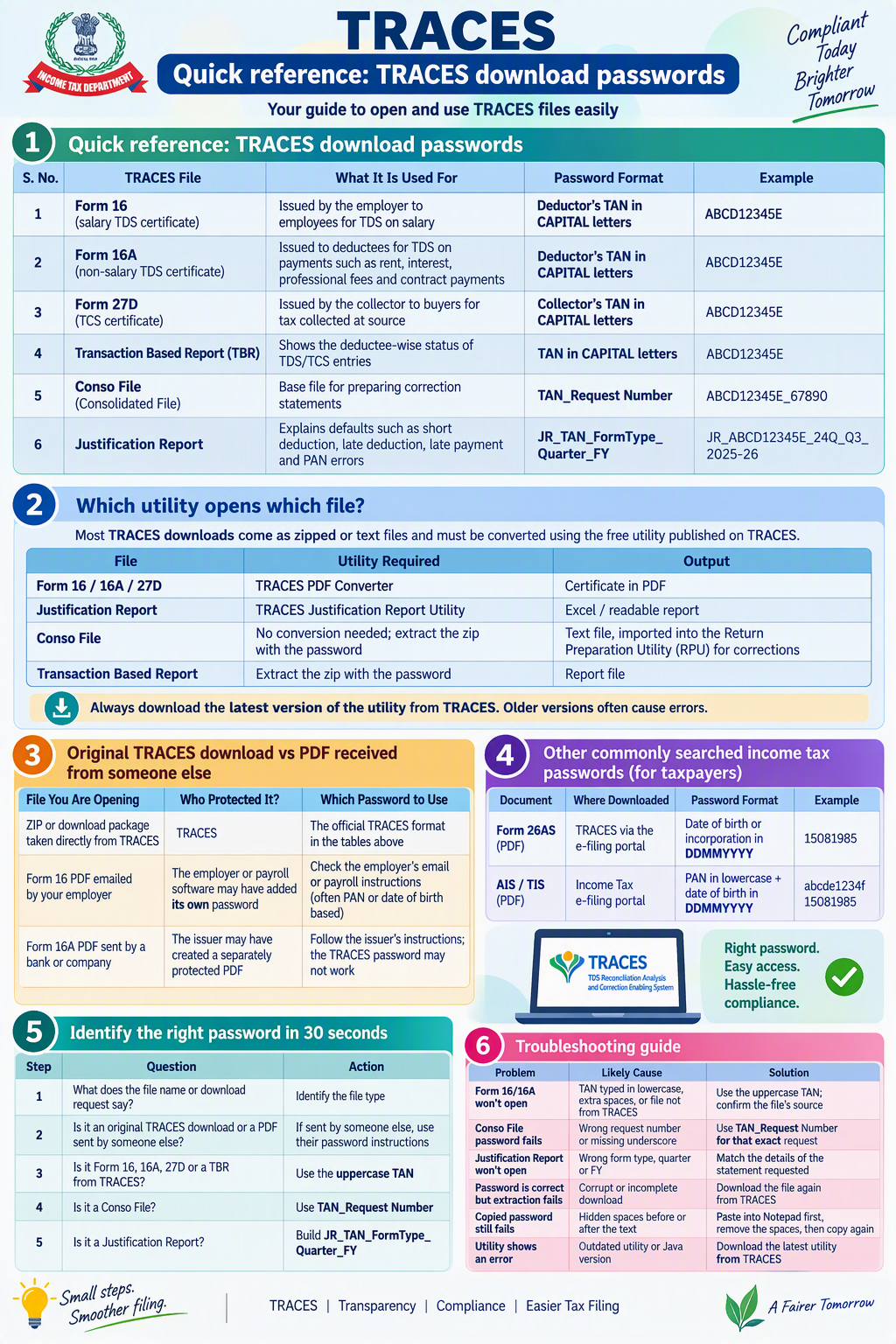
Table of Contents
TRACES Password Guide 2026: Conso File, Form 16/16A, Justification Report and More
Short answer: TRACES has no single universal password. The password depends on which file you downloaded. Identify the file type first, then use the format for that file.
1. Quick reference: TRACES download passwords
| S. No. | TRACES File | What It Is Used For | Password Format | Example |
|---|---|---|---|---|
| 1 | Form 16 (salary TDS certificate) | Issued by the employer to employees for TDS on salary | Deductor’s TAN in CAPITAL letters | ABCD12345E |
| 2 | Form 16A (non-salary TDS certificate) | Issued to deductees for TDS on payments such as rent, interest, professional fees and contract payments | Deductor’s TAN in CAPITAL letters | ABCD12345E |
| 3 | Form 27D (TCS certificate) | Issued by the collector to buyers for tax collected at source | Collector’s TAN in CAPITAL letters | ABCD12345E |
| 4 | Transaction Based Report (TBR) | Shows the deductee-wise status of TDS/TCS entries | TAN in CAPITAL letters | ABCD12345E |
| 5 | Conso File (Consolidated File) | Base file for preparing correction statements | TAN_Request Number | ABCD12345E_67890 |
| 6 | Justification Report | Explains defaults such as short deduction, late deduction, late payment and PAN errors | JR_TAN_FormType_Quarter_FY | JR_ABCD12345E_24Q_Q3_2025-26 |
2. Password structure explained
(a) TAN-based passwords: Form 16, 16A, 27D and TBR
| Component | Rule | Correct | Incorrect |
|---|---|---|---|
| TAN | Full 10-character TAN | ABCD12345E | ABCD1234 |
| Letter case | All letters in uppercase | ABCD12345E | abcd12345e |
| Spaces | No spaces before, after or inside | ABCD12345E | ABCD 12345E |
(b) Conso File password: TAN_Request Number
| Component | Meaning | Example |
|---|---|---|
| TAN | Deductor’s TAN in uppercase | ABCD12345E |
| _ | One underscore as separator | _ |
| Request Number | Request number generated on TRACES for that specific Conso file request | 67890 |
| Final password | ABCD12345E_67890 |
Conso File checklist
| ✔ | Check |
|---|---|
| ☐ | Full TAN used |
| ☐ | TAN letters in uppercase |
| ☐ | Request number of that particular download request (not an older request) |
| ☐ | Exactly one underscore between TAN and request number |
| ☐ | No spaces anywhere |
(c) Justification Report password: JR_TAN_FormType_Quarter_FY
| Component | Meaning | Possible Values |
|---|---|---|
| JR | Fixed prefix | JR |
| TAN | Deductor or collector TAN, in uppercase | ABCD12345E |
| FormType | Type of TDS/TCS statement | 24Q, 26Q, 27Q, 27EQ |
| Quarter | Quarter of the statement | Q1, Q2, Q3, Q4 |
| FY | Financial year of the statement | 2025-26 |
| Final password | Parts joined with underscores | JR_ABCD12345E_26Q_Q2_2025-26 |
⚠️ If the report does not open, don’t guess the financial year. Check the form type, quarter and FY of the exact statement for which the report was requested.
3. Which utility opens which file?
Most TRACES downloads come as zipped or text files and must be converted using the free utility published on TRACES.
| File | Utility Required | Output |
|---|---|---|
| Form 16 / 16A / 27D | TRACES PDF Converter | Certificate in PDF |
| Justification Report | TRACES Justification Report Utility | Excel / readable report |
| Conso File | No conversion needed; extract the zip with the password | Text file, imported into the Return Preparation Utility (RPU) for corrections |
| Transaction Based Report | Extract the zip with the password | Report file |
Always download the latest version of the utility from TRACES. Older versions often cause errors.
4. Original TRACES download vs PDF received from someone else
| File You Are Opening | Who Protected It? | Which Password to Use |
|---|---|---|
| ZIP or download package taken directly from TRACES | TRACES | The official TRACES format in the tables above |
| Form 16 PDF emailed by your employer | The employer or payroll software may have added its own password | Check the employer’s email or payroll instructions (often PAN or date of birth based) |
| Form 16A PDF sent by a bank or company | The issuer may have created a separately protected PDF | Follow the issuer’s instructions; the TRACES password may not work |
5. Other commonly searched income tax passwords (for taxpayers)
| Document | Where Downloaded | Password Format | Example |
|---|---|---|---|
| Form 26AS (PDF) | TRACES via the e-filing portal | Date of birth or incorporation in DDMMYYYY | 15081985 |
| AIS / TIS (PDF) | Income Tax e-filing portal | PAN in lowercase + date of birth in DDMMYYYY | abcde1234f15081985 |
6. Identify the right password in 30 seconds
| Step | Question | Action |
|---|---|---|
| 1 | What does the file name or download request say? | Identify the file type |
| 2 | Is it an original TRACES download or a PDF sent by someone else? | If sent by someone else, use their password instructions |
| 3 | Is it Form 16, 16A, 27D or a TBR from TRACES? | Use the uppercase TAN |
| 4 | Is it a Conso File? | Use TAN_Request Number |
| 5 | Is it a Justification Report? | Build JR_TAN_FormType_Quarter_FY |
7. Troubleshooting guide
| Problem | Likely Cause | Solution |
|---|---|---|
| Form 16/16A won’t open | TAN typed in lowercase, extra spaces, or file not from TRACES | Use the uppercase TAN; confirm the file’s source |
| Conso File password fails | Wrong request number or missing underscore | Use TAN_Request Number for that exact request |
| Justification Report won’t open | Wrong form type, quarter or FY | Match the details of the statement requested |
| Password is correct but extraction fails | Corrupt or incomplete download | Download the file again from TRACES |
| Copied password still fails | Hidden spaces before or after the text | Paste into Notepad first, remove the spaces, then copy again |
| Utility shows an error | Outdated utility or Java version | Download the latest utility from TRACES |
8. Internal control checklist for finance and TDS teams
| S. No. | Control | Purpose |
|---|---|---|
| 1 | Record the TRACES request number against every download request | Conso and other passwords can be traced easily |
| 2 | Store TAN in uppercase in the TDS master data | Avoids case errors |
| 3 | Record the form type, quarter and FY with each Justification Report request | Makes building the JR password simple |
| 4 | Don’t send passwords in the same email as the files | Data security |
| 5 | Keep original TRACES downloads separate from PDFs later issued to employees or deductees | Avoids confusion over passwords |
| 6 | Use a standard folder naming convention, e.g. FY_Quarter_Form_RequestNo (2025-26_Q2_26Q_67890) | Easy retrieval and audit trail |
Note for Tax Year 2026-27 onwards:
Under the Income-tax Act, 2025 and Income-tax Rules, 2026, TDS forms and statements have been renumbered. For example, Form 24Q is replaced by Form 138. TRACES may show the new form numbers in file names and password components for periods from 1 April 2026. Check the form code shown on TRACES for your request.
Need help with TDS returns, correction statements or clearing TRACES defaults?
Rajput Jain & Associates, Chartered Accountants
At P-6/90 (2F), Connaught Circus, New Delhi – 110001 📱 +91-98-11-322-785 | ☎️ 9555 555 480 | Email info@carajput.com | www.carajput.com
This guide is for general information only. Password formats are as per TRACES guidance and may change; always refer to the latest instructions on the TRACES portal.
**********************************************************
If this article has helped you in any way, i would appreciate if you could share/like it or leave a comment. Thank you for visiting my blog.
Legal Disclaimer:
The information / articles & any relies to the comments on this blog are provided purely for informational and educational purposes only & are purely based on my understanding / knowledge. They do noy constitute legal advice or legal opinions. The information / articles and any replies to the comments are intended but not promised or guaranteed to be current, complete, or up-to-date and should in no way be taken as a legal advice or an indication of future results. Therefore, i can not take any responsibility for the results or consequences of any attempt to use or adopt any of the information presented on this blog. You are advised not to act or rely on any information / articles contained without first seeking the advice of a practicing professional.